
Storage schema
To support iterations over the storage layer contents, Loki has a configurable storage schema. The schema is defined to apply over periods of time. A from value marks the starting point of that schema. The schema is active until another entry defines a new schema with a new from date.
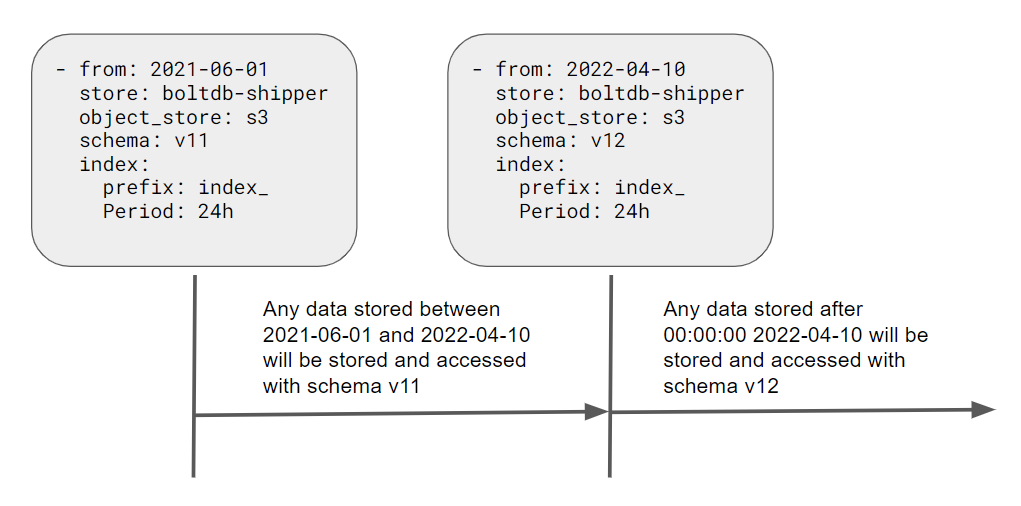
Loki uses the defined schemas to determine which format to use when storing and querying the data.
Use of a schema allows Loki to iterate over the storage layer without requiring migration of existing data.
New Loki installs
For a new Loki install with no previous data, here is an example schema configuration with recommended values
schema_config:
  configs:
    - from: 2024-04-01
      object_store: s3
      store: tsdb
      schema: v13
      index:
        prefix: index_
period: 24hNote
For a new install, the
fromdate must be in the past so the schema is immediately active when Loki starts. If you set it to a future date, Loki will have no valid schema for the current time and will not be able to store incoming data.This is different from adding a new schema entry to an existing install, where the
fromdate must be in the future. See Changing the schema below.
Warning
tsdbandv13are not only recommended, they are required in most cases. Structured metadata and native OpenTelemetry Protocol (OTLP) ingestion are enabled by default (allow_structured_metadata: truein thelimits_configblock), and both features require the active schema period to use thetsdbindex type and schemav13or newer. If structured metadata is enabled and the active schema does not meet this requirement, Loki fails to start with one of these errors:
CONFIG ERROR: schema v13 is required to store Structured Metadata and use native OTLP ingestion...CONFIG ERROR: `tsdb` index type is required to store Structured Metadata and use native OTLP ingestion...To resolve this, either:
- Add a new schema entry with a future
fromdate that usesstore: tsdbandschema: v13or newer. See Changing the schema below.- Or, set
allow_structured_metadata: falsein thelimits_configblock (or pass-validation.allow-structured-metadata=false) until you can complete the schema migration.For background, refer to Structured metadata and the upgrade guide.
Deprecated boltdb-shipper store
store: boltdb-shipper is a deprecated index type. It is still accepted for existing Loki 3.x installs that have not yet migrated, but it must not be used for new installs, and it is being removed in Loki 4.0.
boltdb-shipper also does not support structured metadata or native OTLP ingestion, both of which require tsdb. If you are running boltdb-shipper, refer to
Single Store BoltDB (boltdb-shipper) and plan to migrate to tsdb using the guidance in Changing the schema below.
Changing the schema
Note
The guidance in this section applies when you are adding a new schema entry to an existing Loki install that already has data. Setting the
fromdate to a future date gives Loki time to transition to the new schema and ensures that existing data continues to be read using the old schema. If thefromdate is not in the future, data written just before the cutover may become unreadable because Loki would try to query it using the wrong schema.For a brand new install with no previous data, the
fromdate should be in the past instead. See New Loki installs above.
Here are items to consider when changing the schema; if schema changes are not done properly, a scenario can be created which prevents data from being read.
Always set the
fromdate in the new schema to a date in the future.The
fromdate is interpreted by Loki to start at 00:00:00 UTC. Therefore, Loki must have a date in the future to be able to transition to the new schema when that date and time arrives.Be aware of your relation to UTC when using the current date. Make sure that UTC 00:00:00 has not already passed for your current date.
As an example, assume that the current date is 2022-04-10, and you want to update to the v13 schema, so you restart Loki with 2022-04-11 as the
fromdate for the new schema. If you forget to take into account that your timezone is UTC -5:00 and it’s currently 20:00 hours in your local timezone, that is actually 2022-04-11T01:00:00 UTC. When Loki starts it will see the new schema and begin to write and store objects following that new schema. If you then try to query data that was written between 00:00:00 and 01:00:00 UTC, Loki will use the new schema and the data will be unreadable, because it was created with the previous schema.You cannot undo or roll back a schema change.
Any data written with an active schema can only be read by that schema. If you wish to return to the previous schema; you can add another new entry with the previous schema settings.
Schema configuration example
This example shows a schema change: data ingested before 2022-01-20 used schema v12, and data ingested on or after that date uses schema v13. Both periods use tsdb as the store and gcs as the object store; only the schema version changes.
schema_config:
  configs:
    - from: "2020-07-31"
      index:
        period: 24h
        prefix: loki_ops_index_
      object_store: gcs
      schema: v12
      store: tsdb
    - from: "2022-01-20"
      index:
        period: 24h
        prefix: loki_ops_index_
      object_store: gcs
      schema: v13
      store: tsdb